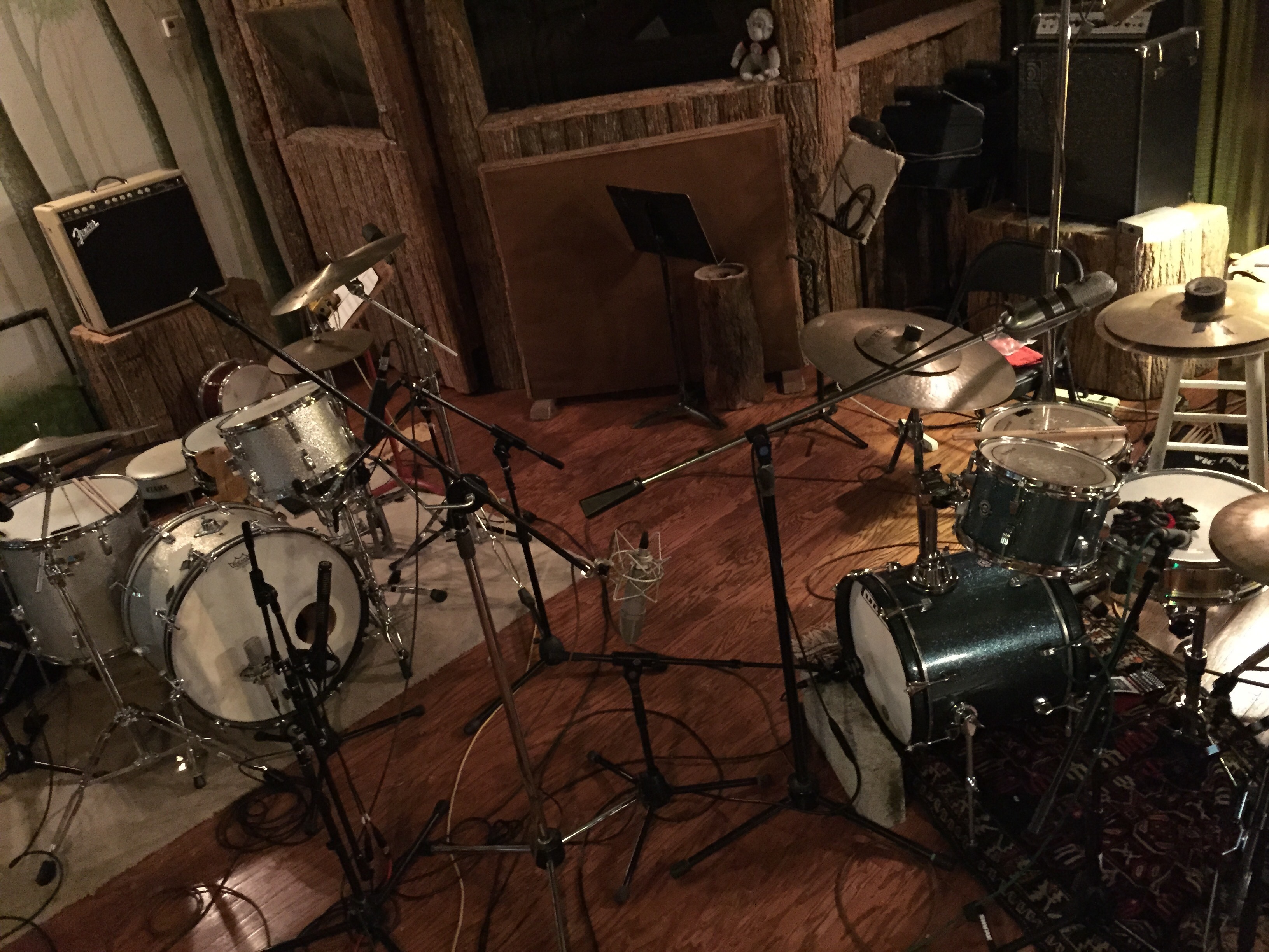
I had a such a great time last week at the Friend­ly For­est (Cre­ative Work­shop Stu­dio in Nashville, TN). Made some new friends, hugged some old friends, spent equal time in space explo­ration and play­ing respectable music which may actu­al­ly end up on an album one day.

I also hopped around like a kid at Christ­mas between these two kits, and if you thought this post was just an excuse to be a drum geek for a sec, then you are RIGHT.

On the left is my 1970s 3‑ply maple Lud­wig; on the right is Ted­dy Morgan’s new sweet Quest­love” kit. The Quest­love is so, so tiny but sounds sur­pris­ing­ly punchy under a set of mics. The rebound off of these lit­tle drums is way dif­fer­ent than what I’m used to and it made it a joy to play. There are lots of vin­tage Zild­jians and new Istan­buls and goat hooves and met­al bits and spurs and blades and chains and shak­ers sprin­kled about, too.

B.B.

When I was kid, I only knew B.B. King as a car­i­ca­ture of him­self. He was a large, round man, always smil­ing, played old-time music on a big black gui­tar worn high on his belly.

I first gave the man some seri­ous thought while watch­ing an episode of The Cos­by Show; I still didn’t know much about him but I knew that guest stars on the show were usu­al­ly leg­endary in some way, and so I paid atten­tion. I thought he was enter­tain­ing and fun, noth­ing I hadn’t heard before, some­where, but that pierc­ing mel­low gui­tar tone instant­ly made his music a signature.

Fast for­ward sev­er­al years…

I had learned to play a decent blues shuf­fle over the years but nev­er real­ly stud­ied it; it was some­thing I did as an after­thought, da da, da da, da da. My friend Ted­dy Mor­gan decid­ed that had gone on for far too long and popped a CD in the van, and it was there, on some anony­mous stretch of Mid­west inter­state, that I was intro­duced to the music of B.B. King for the first time.

This music was alive; it was a liv­ing, breath­ing soul brought to life by a fero­cious but restrained rhythm sec­tion and a pow­er­ful voice punc­tu­at­ed by a sharp, quick gui­tar. It was the sound of gen­er­a­tions of music that came before it and hints of the direc­tions it would take in the future.

It’s no sur­prise that a young me would dis­miss B.B. King as some­thing vague­ly famil­iar, because he was famil­iar; I was born into a world whose music had already been shaped by him. His con­tri­bu­tions are almost swept away by the sea of peo­ple he inspired.

B.B. King is blues music, one of those del­i­cate gen­res whose rel­e­van­cy today is main­tained most­ly by its lega­cy. But, oh, what a legacy.

Live: A Few Questions

So I’ve got­ten a few ques­tions about my Able­ton Live series,” some of which I’ll answer even­tu­al­ly but here are a few I prob­a­bly should have touched on:

Will my [so-and-so] com­put­er work for this?

Chances are — yes? Cur­rent­ly I use a 2011 Mac­book Pro, with a quad-core i7 and 16GB of RAM. It’s get­ting a lit­tle wheezy now, but at the time it was hot pota­toes and I’ve nev­er had an issue with my Live set­up. For years before that I used a 2006 Mac­book with a duo core and 4GB and nev­er had any issues, either. If you’re hav­ing CPU issues, there are a bunch of things you can try to reduce the load.

I’ve got a [so-and-so] inter­face, will that work?

Chances are — yes? My opin­ion on inter­faces is that they all sound good these days. I mean, it’s real­ly hard to buy a bad sound­ing inter­face. If you’ve got some­thing that’s work­ing for you and sounds good and gets along with your com­put­er, by all means stick with it. It’s easy to buy a crap­py inter­face with bad dri­vers, though, so if you don’t own any­thing yet it’s worth research­ing reviews from peo­ple with the same com­put­er you have.

Why aren’t you using USB MIDI?

USB MIDI is pret­ty awe­some, real­ly; MIDI isn’t that resource heavy and a USB bus is more than enough for it. (And you get bus pow­er too!) The main rea­sons I shy away from it are:

  1. I use the Roland SPD-SX as my pri­ma­ry MIDI con­troller, and at the time I bought it the USB dri­vers were a lit­tle screwy. I’ve used its USB bus since then but I stick with MIDI, just in case.
  2. I need more than one input, so to have enough ports I’d need to run a USB hub, which is more tiny lit­tle cables with del­i­cate con­nec­tors than I feel like deal­ing with.
  3. USB spec only allows for runs of ten feet, any­thing longer than that needs a pow­ered repeater cable or a pow­ered hub in between.

Basi­cal­ly, it’s most­ly a mat­ter of per­son­al con­ve­nience, and a lit­tle peace of mind. If you’ve only got one or two con­trollers and they’re all fair­ly close to you, or if your inter­face doesn’t have stan­dard MIDI ports, USB is the way to go.

Live, Pt. 3: The Click Scene

Wel­come to a third post of a behind-the-scenes look into my Able­ton Live set­up. The first posts are some­thing of a primer, describ­ing the gear I use and the basics of set­ting up a mix; from here, I dive a lit­tle deep­er into the Able­ton waters. If this is your first time here, or if you’re new to Live, you might want to start at the begin­ning.

The Click

One of the first things I set up in a typ­i­cal Wits ses­sion is the click track. A click is a real­ly help­ful tool on the show; I use it both as a quick ref­er­ence before count­ing off a musi­cal num­ber and occa­sion­al­ly as a metronome when a con­sis­tent tem­po is help­ful. Live has a built-in metronome which is rout­ed by default to the cue mix, but since mechan­i­cal beeps are a lit­tle less than inspir­ing I pre­fer to use clips on a ded­i­cat­ed track.

Continue reading →

Live, Pt. 1: The Gear

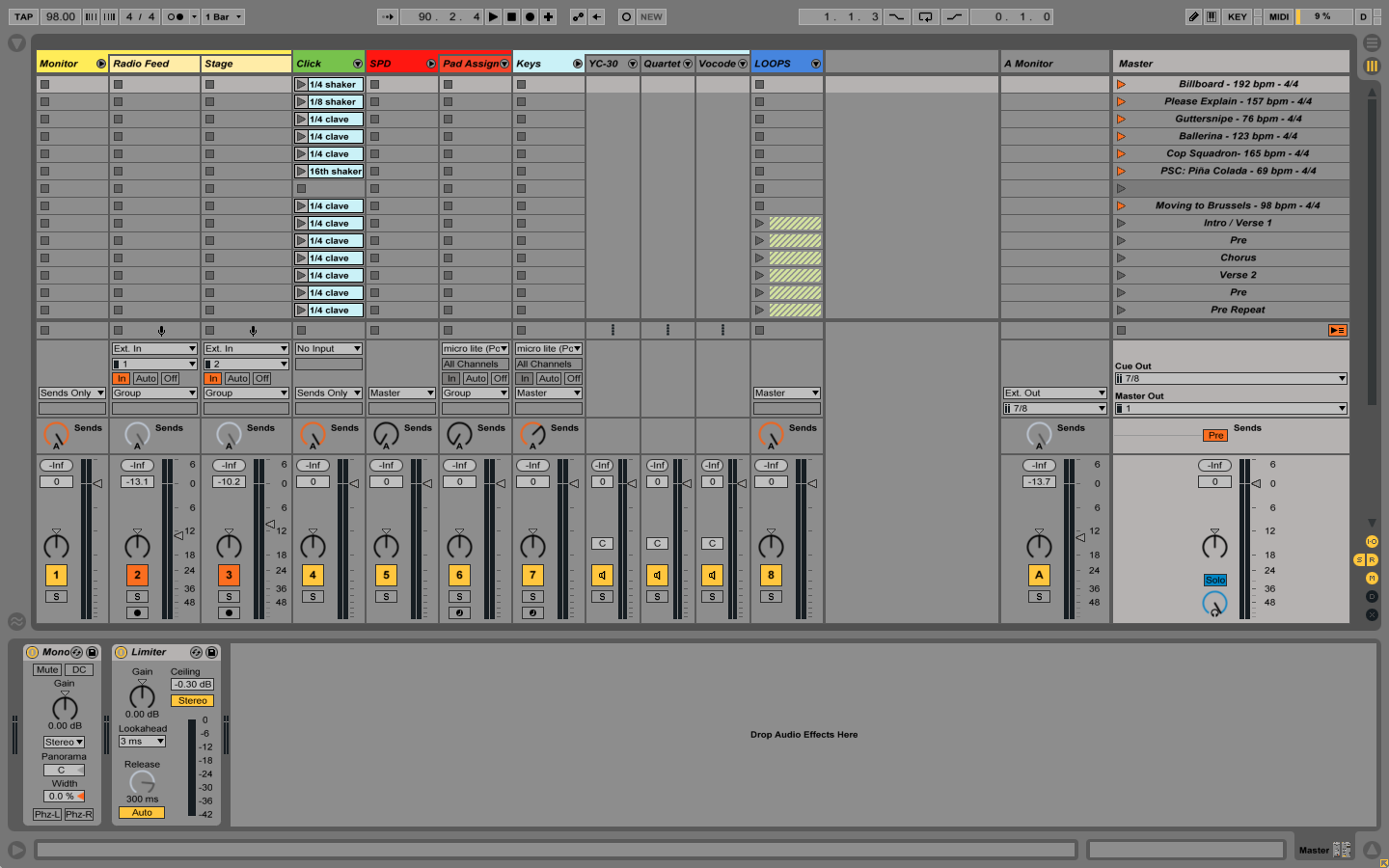
For my first for­ay into describ­ing how I use Able­ton Live, I fig­ured I’d start with what I actu­al­ly use it to do and what gear I need to make that hap­pen. A pret­ty typ­i­cal Wits ses­sion will look some­thing like this (click thumb­nails to see full size):

Ableton Live session view

If you’re super-new to Live, this screen might look a bit intim­i­dat­ing, but it’s all pret­ty sim­ple once you know the basic lay­out. Let’s dive right in.

Continue reading →

How I Use Ableton Live

Of all the things I’ve learned about using Able­ton Live, the biggest is that it will result in ques­tions. Lots and lots of ques­tions, like: What’s the lap­top doing?, or Where are those sounds com­ing from?, or I saw you hit­ting a lot of pads, what’s with that?, or Are you check­ing your email from on stage?

So, I thought I’d take advan­tage of an after­noon off and share with the world my Able­ton Live set­up for Wits, which has more things going on in the lap­top than per usu­al for me.

Live can han­dle a lot of needs, and my Wits set­up cov­ers them all pret­ty grace­ful­ly. I’ll break up this tuto­ri­al/s­neaky-peek likewise:

Now, one of the best things about Live is it’s real­ly ver­sa­tile, I mean, REAL­LY ver­sa­tile, and there are about 100 dif­fer­ent ways to accom­plish any giv­en task. If you’re an Able­ton wiz­ard you might sigh and shake your head sad­ly when you see my set­up but this is what’s work­ing for me. For the sake of these posts I’m gonna assume you’re not an Able­ton Wiz­ard but, at the least, have a work­ing knowl­edge of Live and how to get around it.

Cool? Cool. First up: the gear.

Hap­py 2015! Here’s hop­ing it’s one giant cook­ie car­ni­val for everyone.

BYC

For the next week or so I’m dri­ving around the Mid­west with my friends in the Back­yard Com­mit­tee. It’s a great line­up of musi­cians and our first night was a blast — the music is a bit on the root­sy, Amer­i­cana side with a lot of room for impro­vi­sa­tion and try­ing out new ideas. Late­ly the shows I’ve been play­ing have been a lit­tle more strict, at least in the sense of learn­ing very spe­cif­ic parts and arrange­ments, so hav­ing some room to stretch out makes for fun nights.

Along with the drum­ming duties I’ve been assigned the role of record­ing engi­neer — the plan is to record every show and release a live album of the best mate­r­i­al. It makes the shows, for us at least, engag­ing on anoth­er lev­el as every night is essen­tial­ly a record­ing ses­sion, albeit one in front of peo­ple. For the record­ing geeks out there, we’re dou­ble-mic­ing every source, with one line going to the front of house and the oth­er line sent to my mobile record­ing rig, a Uni­ver­sal Audio Apol­lo with eight addi­tion­al pre­amps sup­plied by a Audi­ent ASP880 feed­ing into Pro Tools. It’s a quick set­up and on these small­er stages avoids any issues with split­ters or nego­ti­at­ing with house engi­neers. Knock­ing on wood here, but so far things are sound­ing great with no hiccups.

Check out the dates on the fab­u­lous old-school poster below, and hope to see you if we’re com­ing to your town!

Backyard Committee tour poster with dates

In Real Time

I am play­ing all sorts of drums on Chris Kosa’s new record, In Real Time—we record­ed it a while back and I’m excit­ed that it’s com­ing out soon. I was sick as a dog in the stu­dio with the flu but some­how look­ing back it was still a lot of fun. Here’s a pre­view of the first sin­gle, Radio Wave.”